

Quick answer: If your phone speaker is quiet or muffled, the grille is usually clogged with lint or dust, or water is trapped behind it. Clean the grille gently with a soft, dry brush or a piece of painter’s tape, and if it got wet, lay the phone speaker-side down and play a low-frequency tone to push the water out. If there is no sound at all, check the volume, silent mode, Do Not Disturb and Bluetooth first. Crackling, buzzing or distortion usually means the speaker is damaged and needs replacing. Our phone repair shop in Eagan tests speakers and microphones for free.
Key takeaways
- Most “broken” speakers are just dirty. Pocket lint packs into the grille over months.
- Never push pins, needles or cotton swabs into the speaker holes. The mesh and speaker membrane tear easily.
- Water usually clears within a few hours. A low tone helps shake it loose; heat and rice do not.
- Phones have more than one speaker: a loudspeaker at the bottom and an earpiece at the top. Knowing which one is quiet helps find the cause.
In this guide
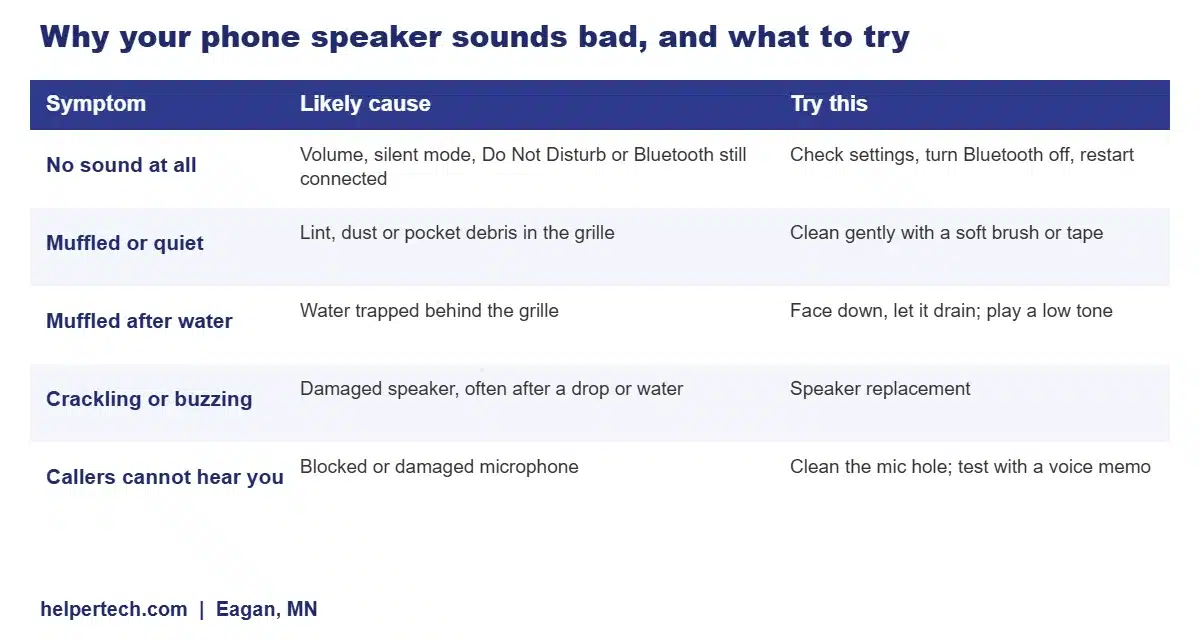
Which Speaker Is the Problem?
Most phones have two speakers. The loudspeaker sits at the bottom edge next to the charging port and plays music, videos and speakerphone calls. The earpiece is the narrow slot at the top of the screen that you hear during normal calls; on many phones it also works as a second speaker for stereo sound. Play a video and cover each one with a finger. If one is silent or much quieter, that is the one to clean or check. If you can hear callers fine but they cannot hear you, the problem is the microphone, not the speaker.
Check These Settings First
- Volume and silent mode. Turn the volume up while media is playing. On iPhone, check the Ring/Silent switch or Action button; on Samsung and Pixel, check the sound mode in quick settings.
- Bluetooth. A connected earbud, speaker or car can steal the audio. Turn Bluetooth off and test again.
- Do Not Disturb or Focus. These silence calls and notifications but not media.
- App volume. Some apps, like games and video apps, have their own volume settings.
- Restart the phone and install any software updates. A stuck audio process is a common cause of sudden silence.
- Accessibility settings. Mono audio or sound balance settings can make one speaker quieter.
How to Clean a Phone Speaker Safely
- Turn the phone off and take it out of its case.
- Brush the grille with a soft, dry, clean brush (a new soft toothbrush or a small makeup brush), holding the phone speaker-side down so debris falls out rather than in.
- Use painter’s tape or sticky putty. Press a piece of low-tack painter’s tape or a small ball of reusable putty against the grille and lift it off. It pulls out dust and lint without pushing anything in. Do not use anything that leaves residue.
- Clean the earpiece the same way. The earpiece mesh collects skin oil and makeup; a soft brush slightly dampened with a little isopropyl alcohol (never dripping) can help. Let it dry fully.
- Test with a video at full volume.
Avoid: pins, needles and toothpicks in the holes, compressed air blasted straight in (it can push dirt deeper or damage the membrane), and liquids. The bottom speaker sits next to the charging port, which collects the same lint; see how to clean a charging port if charging is also acting up.
How to Get Water Out of a Phone Speaker
- Turn the volume up and lay the phone speaker-side down on a towel. Gravity does a lot of the work.
- Tap it gently against your palm with the speaker facing down.
- Play a low-frequency tone. Low tones make the speaker move more, which helps push water droplets out. Free tools such as “fix my speakers” style websites play a tone for this. On iPhone, some people use a third-party Shortcut called Water Eject. (Many smartwatches have this built in, but phones generally do not.)
- Let it air dry for a few hours in a dry spot with airflow.
Do not use a hair dryer or put the phone in rice. If water also got into the charging port, follow our guide on how to get water out of a charging port and do not charge it until it is dry. If the phone was submerged, turn it off and see our water damage repair in Eagan page. Salt water, pool water and drinks leave residue that needs professional cleaning.
How to Test Your Speaker and Microphone
- Speaker: play a video at full volume and listen to each speaker separately.
- Microphone: record a short voice memo or video and play it back. If it sounds muffled, the mic hole (a tiny hole on the bottom or top edge) may be blocked.
- Samsung Galaxy: the Samsung Members app (Support > Phone diagnostics) includes speaker and microphone tests.
- Speakerphone test: call someone on speaker. If they hear an echo or you hear crackling, note it for the technician.
Signs the Speaker Is Damaged
- Crackling, buzzing or rattling at medium or high volume.
- Distortion that does not improve after cleaning and drying.
- No sound from one speaker even after a restart, with Bluetooth off.
- The problem started after a drop or after the phone was submerged.
- Sound cuts in and out when you press on the phone near the speaker.
In these cases, the speaker or its connection has usually failed. A speaker replacement is a fairly quick repair on most phones.
Speaker Repair at Our Eagan Shop
We repair loudspeakers, earpieces and microphones on iPhone, Samsung Galaxy, Google Pixel and other Android phones. First we clean the grilles properly and test the sound, which fixes a lot of phones on the spot. If a part has failed, we give you a quote before any work, and most speaker repairs are done the same day with a 90-day warranty. Speaker prices vary by model, so call 651-427-9087 or stop by for a free check. For iPhone repairs of every kind, see our iPhone repair in Eagan page; for Galaxy phones, see Samsung repair in Eagan.
Related phone repair guides
Frequently Asked Questions
Why is my phone speaker muffled?
Usually because the speaker grille is clogged with lint and dust, or water is trapped behind it. Clean the grille gently with a soft dry brush or low-tack painter’s tape, and if it got wet, lay the phone speaker-side down and let it dry. If it still sounds muffled or crackles, the speaker may be damaged.
How do I get water out of my phone speaker?
Turn the volume up, lay the phone speaker-side down and tap it gently. Playing a low-frequency tone helps push water droplets out. Then let it air dry for a few hours. Do not use a hair dryer or rice.
How do I clean my phone speaker without damaging it?
Turn the phone off, hold it speaker-side down and brush the grille with a soft, dry brush. Pressing low-tack painter’s tape or reusable putty against the grille lifts out dust. Never push pins, needles or cotton swabs into the holes.
Why does my phone have no sound?
Check the volume, silent mode, Do Not Disturb and whether Bluetooth is connected to another device. Restart the phone and update the software. If there is still no sound from the speaker, the speaker or its connection may have failed.
Why can’t people hear me on calls?
That is usually the microphone, not the speaker. The tiny mic hole on the edge of the phone can get blocked by lint, a case or a screen protector. Record a voice memo to test it, and clean the hole gently.
How much does phone speaker repair cost in Eagan?
It depends on the model and which speaker has failed. Helpertech in Eagan checks speakers and microphones for free and gives you a quote before any work. Most speaker repairs are done the same day with a 90-day warranty.
Speaker Still Muffled or Silent? Get a Free Check in Eagan
Bring your iPhone, Samsung, Pixel or other phone to Helpertech at 2040 Cliff Rd #103, Eagan, MN 55122. We clean and test the speakers and microphone for free, and most speaker repairs are done the same day with a 90-day warranty.
About the author: This guide was written by the Helpertech repair team, the technicians at our Eagan phone repair shop at 2040 Cliff Rd #103. Helpertech has been repairing phones, tablets and computers in the Twin Cities since 1995. Prices were checked against our repair pricing page in September 2026.