
Quick answer: Open Settings > Battery > Battery Health (called “Battery Health & Charging” on some models and iOS versions). The Maximum Capacity number shows how much charge your battery holds compared with when it was new. At 80% or lower, or if you see a “Service” message, it is time for a new battery. At our iPhone repair shop in Eagan, an iPhone battery replacement takes about 30 to 60 minutes and costs $100 to $175 depending on the model.
Key takeaways
- Maximum Capacity is the key number. Apple designs iPhone batteries to keep about 80% of their original capacity after a set number of charge cycles.
- iPhone 15 and newer are rated for about 1,000 full cycles; iPhone 14 and older for about 500.
- iPhone 15 and newer also show the cycle count in Settings. Older models need a workaround (below).
- Replace the battery at 80% or below, when “Service” appears, when the phone shuts off at 20 to 30%, or right away if it is swollen.
In this guide
- How to check battery health in Settings (step by step)
- What each battery health message means
- How to check your iPhone battery cycle count
- When to replace your iPhone battery
- How to make your battery last longer
- Why iPhone batteries wear out
- What battery health means for real-life battery life
- Where to get your battery replaced
- “Unknown part” and non-genuine battery messages
- iPhone battery replacement prices in Eagan
- FAQs
How to Check iPhone Battery Health in Settings
- Open the Settings app.
- Tap Battery.
- Tap Battery Health (or Battery Health & Charging on older models and iOS versions).
- Look at Maximum Capacity (a percentage) and Peak Performance Capability (a message). On iPhone 15 and newer you will also see the Cycle Count here or under Settings > General > About, depending on your iOS version.
Maximum Capacity is not the same as the battery percentage in your status bar. The status bar shows how full the battery is right now. Maximum Capacity shows how big the “tank” still is. A phone at 78% Maximum Capacity that reads 100% charged only holds about 78% of the energy it held when new, which is why it dies sooner.
What Each Battery Health Message Means
| What you see | What it means | What to do |
|---|---|---|
| “Your battery is currently supporting normal peak performance.” | The battery is healthy enough to power the phone at full speed. | Nothing. Check again every few months. |
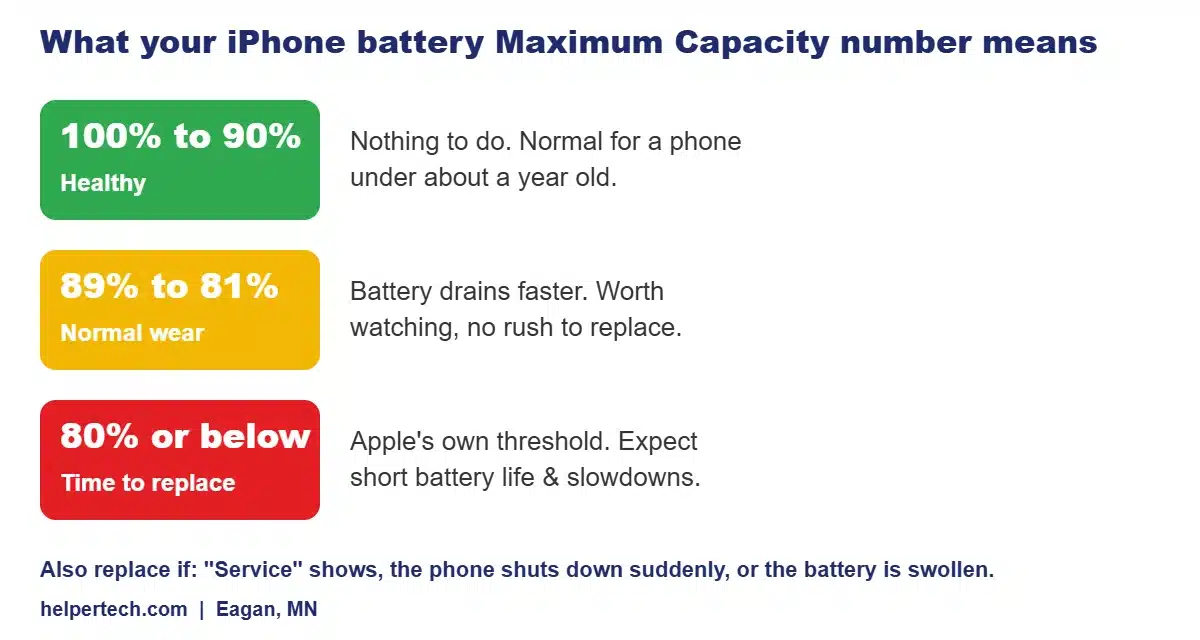
| Maximum Capacity 90% to 100% | Normal for a newer phone. | Nothing. |
| Maximum Capacity 81% to 89% | Normal wear. Battery life is shorter than new. | Keep an eye on it. Replace when it bothers you. |
| Maximum Capacity 80% or below | The battery has reached the level Apple considers worn. | Plan a battery replacement. |
| “This iPhone has experienced an unexpected shutdown… performance management has been applied.” | iOS is slowing the phone slightly to stop sudden shutdowns. | A new battery removes the slowdown. |
| “Your battery’s health is significantly degraded…” or “Service” | The battery needs replacing. | Replace the battery soon. |
| “Unable to verify this iPhone has a genuine Apple battery” or “Unknown Part” | The battery was replaced with a part iOS cannot verify. | Not dangerous in itself, but ask what battery your shop uses. Battery health data may be limited. |
How to Check Your iPhone Battery Cycle Count
A charge cycle is using 100% of the battery’s capacity, in total, not in one go. Draining from 100% to 50% on Monday and again on Tuesday adds up to one cycle.
iPhone 15 and newer
The cycle count is built into Settings. Look under Settings > Battery > Battery Health, or Settings > General > About, depending on your iOS version. The same screens also show the battery’s manufacture date and first use date.
iPhone 14 and older
Apple does not show the cycle count in Settings on these models, but you can find it in the analytics logs:
- Make sure Settings > Privacy & Security > Analytics & Improvements > Share iPhone Analytics is turned on (you may need to wait a day for logs to appear).
- Tap Analytics Data on the same screen.
- Open the most recent file that starts with “log-aggregated”.
- Copy the text, paste it into the Notes app and search for CycleCount. The number after it is your cycle count.
If that sounds like a hassle, bring it in. We can read the battery’s cycle count and health in a couple of minutes at our Eagan shop, for free.
| iPhone models | Rated to keep about 80% capacity at |
|---|---|
| iPhone 15, 16, 17 series and newer | About 1,000 full charge cycles |
| iPhone 14 series and older | About 500 full charge cycles |
When Should You Replace Your iPhone Battery?
Replace the battery if any of these apply:
- Maximum Capacity is 80% or lower.
- Battery Health shows a “Service” or “significantly degraded” message.
- The phone shuts down at 20% to 30%, or in cold weather. Minnesota winters are hard on worn batteries; see why your phone dies in the cold.
- The phone feels slow and Battery Health says performance management has been applied.
- The phone gets hot during normal use or charging. See why is my phone hot.
- The battery is swollen: the screen lifts from the frame, the back bulges, or you see a bright spot on the screen from pressure. Stop charging it and replace it right away.
A new battery is often the cheapest way to make an older iPhone feel new again. For a full breakdown of Apple’s and third-party prices, see our iPhone battery replacement cost guide.
How to Make Your iPhone Battery Last Longer
- Turn on Optimized Battery Charging (Settings > Battery > Charging). It holds charging at 80% overnight until you need the phone. On iPhone 15 and newer you can also set a charging limit.
- Avoid heat. Heat is the biggest cause of battery wear. Do not leave the phone on a car dashboard or charge it under a pillow.
- Avoid running it to 0% often, and do not store it fully drained.
- Use a good charger and cable. Cheap chargers can overheat the battery.
- Keep iOS updated. Updates often include battery and charging improvements.
“Unknown Part” and Non-Genuine Battery Messages
If your battery was replaced before, iOS may show “Unknown Part” or say it cannot verify a genuine Apple battery. That message alone does not mean the battery is unsafe. It means iOS cannot verify the part, and it may limit the battery health details you see. When you get a battery replaced, ask what battery the shop uses and what warranty it has. Every battery replacement at Helpertech comes with a 90-day warranty.
Why iPhone Batteries Wear Out
Every iPhone uses a lithium-ion battery. Each time it charges and discharges, a tiny amount of the material that stores energy stops working, so the battery slowly holds less charge. Three things speed that up:
- Heat. Charging while the phone is hot (gaming while charging, wireless charging in a thick case, sun on a dashboard) wears the battery fastest.
- Time at 100% or 0%. Sitting fully charged for hours, or being drained flat often, stresses the cells.
- Cycle count. The more full cycles, the lower the capacity. Heavy users can reach 500 cycles in well under two years.
Cold does not damage the battery the same way, but it temporarily reduces how much power it can deliver. That is why a worn battery that seems fine indoors can shut the phone down at a Minnesota bus stop in January.
What Battery Health Means for Real-Life Battery Life
The percentage is only an estimate. Two phones at 85% can behave very differently, depending on the apps you use, screen brightness, signal strength and the iOS version. As a rough guide from what we see at the shop:
| Maximum Capacity | What most people notice |
|---|---|
| 95% to 100% | Battery lasts a full day with normal use. |
| 86% to 94% | You may top up in the late afternoon on busy days. |
| 81% to 85% | Noticeably shorter battery life; the percentage drops faster near the end. |
| 80% and below | Charging more than once a day, and possible shutdowns in the cold or under heavy use. |
If your battery health looks fine but the battery still drains fast, the cause may be an app, a weak cellular signal or a background process rather than the battery itself. Check Settings > Battery to see which apps use the most power over the last 24 hours and 10 days.
Where to Get Your iPhone Battery Replaced
You have three choices. Apple and Apple Authorized Service Providers use genuine Apple batteries, and replacement is free under AppleCare+ if the battery is below 80%. Out of warranty, you pay Apple’s battery service price and usually need an appointment. A local shop like Helpertech in Eagan offers walk-in service, a free battery check and a 90-day warranty, often for less. A DIY kit is the cheapest option but risks damaging the screen, Face ID or the battery itself, which can catch fire if punctured. For a side-by-side comparison, read Apple Store vs. local iPhone repair near Eagan.
iPhone Battery Replacement Prices in Eagan
| iPhone model | Battery replacement at Helpertech Eagan |
|---|---|
| iPhone XS, XR, 11 series | $100 |
| iPhone 12 and 13 series | $120 |
| iPhone 14 and 15 series | $130 |
| iPhone 16 series | $150 |
| iPhone 17 series | $175 |
Prices are from our repair pricing page. Most iPhone battery replacements in Eagan are done while you wait, and your data stays on the phone. Not sure whether you need a battery or something else? If your iPhone will not charge at all, read why won’t my phone charge first.
Related iPhone battery guides
Related guide: If your iPhone restarts on its own or freezes at startup, a worn battery is a common cause. See iPhone stuck on the Apple logo or keeps restarting.
Frequently Asked Questions
What is a good battery health for an iPhone?
Anything from about 85% to 100% Maximum Capacity is good. Between 81% and 85% the battery still works but lasts noticeably less. At 80% or below, Apple considers the battery worn and recommends a replacement.
Is 85% battery health bad on an iPhone?
No. 85% is normal wear for a phone that is a year or two old. You will notice shorter battery life than when it was new, but there is no need to replace it unless it is shutting down or you are charging it more than once a day.
How do I check the battery cycle count on my iPhone?
On iPhone 15 and newer, it is in Settings under Battery > Battery Health or General > About, depending on your iOS version. On iPhone 14 and older, open Settings > Privacy & Security > Analytics & Improvements > Analytics Data, open the latest log-aggregated file and search for CycleCount.
Does charging overnight ruin my iPhone battery?
Not if Optimized Battery Charging is on. It holds the charge at 80% overnight and finishes charging just before you usually unplug. Heat does more damage than overnight charging, so do not charge under a pillow or blanket.
How long does an iPhone battery replacement take in Eagan?
At Helpertech in Eagan, most iPhone battery replacements take about 30 to 60 minutes and you can wait while we do it. Prices range from $100 for an iPhone XS, XR or 11 to $175 for an iPhone 17, with a 90-day warranty.
Why does my iPhone say Service under battery health?
“Service” means iOS has detected that the battery has degraded significantly. The phone still works, but it will drain faster and may shut down unexpectedly. Replacing the battery clears the message.
Need a New iPhone Battery? We Do It While You Wait in Eagan
Bring your iPhone to Helpertech at 2040 Cliff Rd #103, Eagan, MN 55122. We check your battery health for free, give you a clear price, and most battery replacements are done in under an hour with a 90-day warranty.
About the author: This guide was written by the Helpertech repair team, the technicians at our Eagan phone repair shop at 2040 Cliff Rd #103. Helpertech has been repairing phones, tablets and computers in the Twin Cities since 1995. Prices were checked against our repair pricing page in September 2026.