
Quick answer: Lines on an iPhone screen almost always come from the display hardware: a damaged screen panel, a loose or damaged display connector, or liquid damage. A single thin green or pink line on newer iPhones usually means the OLED panel is damaged. Many flickering colored lines usually point to the display connection. Only lines that appear in screenshots, or only inside one app, are software. If you are in or near Eagan, our iPhone repair in Eagan team can check it for free and usually replace the screen the same day.
Key takeaways
- Take a screenshot. If the lines are not in the screenshot, the problem is in the screen hardware, not iOS.
- A single green line on an iPhone 12 or newer is an OLED panel fault. It does not go away with an update.
- Black lines on an iPhone 11 or XR usually mean the LCD is cracked internally or the display cable is damaged.
- Lines that spread, flicker or come with touch problems can turn into a black screen. Back up your iPhone today.
- Screen replacement at our Eagan shop runs from about $120 (iPhone 11) to $365 (iPhone 17 Pro Max), with a 90-day warranty.
In this guide
What Each Type of Line Means
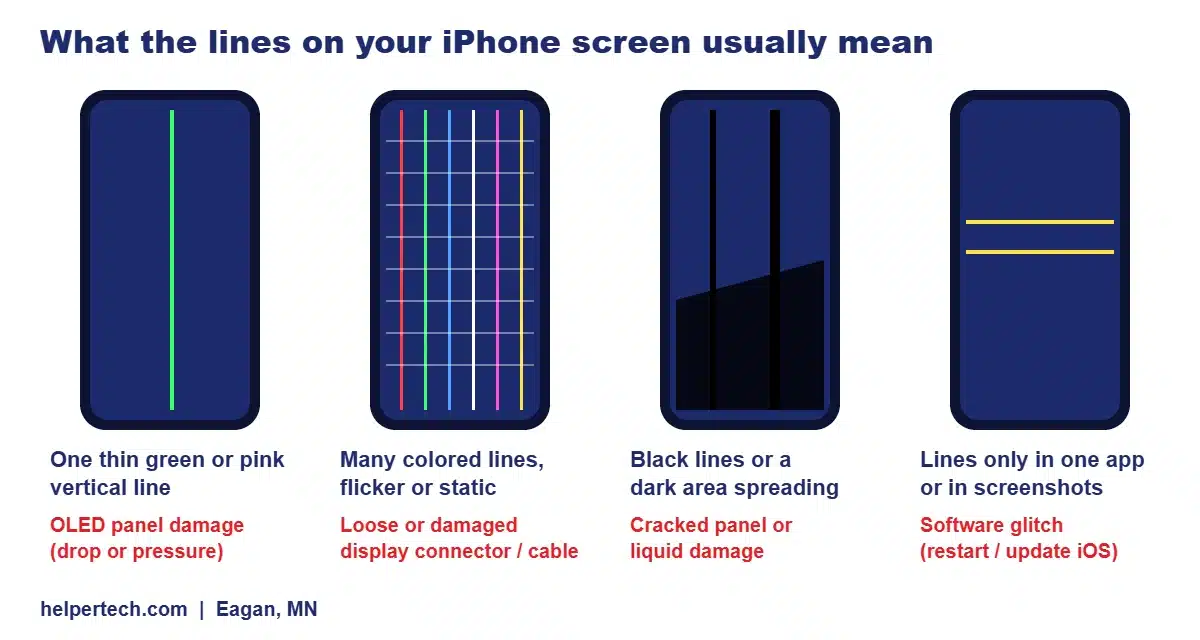
The color, direction and behavior of the lines tell you a lot about the cause. Use this table to narrow it down before you spend money:
| What you see | Most likely cause | Can it be fixed without a new screen? |
|---|---|---|
| One thin vertical green, pink or purple line that never moves | OLED panel damage, often after a drop or pressure | No. The panel needs replacing |
| Several thin colored lines, sometimes flickering | Loose, dirty or damaged display connector or flex cable | Sometimes. Reseating the connector can fix it; a torn cable means a new screen |
| Horizontal lines that flicker or “roll” | Display connection problem, or a failing display driver | Sometimes, after a technician checks the connector |
| Thick black lines or a black patch that grows | Internal crack in the LCD or OLED, or liquid damage | No. Needs a new screen (and a water damage check if it got wet) |
| White lines across an LCD iPhone (11, XR, SE) | Damaged LCD or a pinched display cable | Rarely. Usually needs a new screen |
| Lines that also show in screenshots, or only in one app | Software or an app bug | Yes. Restart, update iOS or update the app |
| Lines that started right after a screen repair | Poorly seated connector or a low-quality replacement screen | Yes, by the shop that did the repair (under warranty) |
6 Causes of Lines on an iPhone Screen
1. A drop or pressure damaged the screen panel
This is the most common cause we see. The glass can look perfect while the panel under it is damaged. On OLED iPhones, the pixels are arranged in columns. When a column’s wiring breaks, you get one thin vertical line, usually green or pink, from top to bottom. On LCD iPhones, pressure damage often shows as black or white lines or a dark bleed spreading from the impact point. If the phone was dropped recently, read our guide on what to do in the first hour after a drop.
2. A loose or damaged display connector
The screen plugs into the logic board with a small flex cable and connector. A hard knock can shift that connector just enough to scramble the signal, which shows up as multicolored lines, flicker or static. The good news: if the connector just needs reseating, the repair is quick and inexpensive. If the flex cable itself is torn or creased, the screen has to be replaced.
3. Liquid damage
Water or other liquid that reaches the display connector or the panel causes corrosion. Lines from liquid damage often start small and spread over days, sometimes with a flickering or dim screen. Check the liquid contact indicator inside the SIM tray slot with a flashlight: red or pink means liquid got in. See our iPhone water damage repair in Eagan page for what to do next.
4. A faulty screen from a previous repair
If lines appeared soon after a screen replacement, the connector may not be fully seated, or the replacement screen may be a low-grade part. A good shop will fix this under warranty. Every repair at Helpertech carries a 90-day warranty.
5. A logic board problem
Less often, the fault is on the phone’s main board: a damaged display connector on the board side, or a failed component that powers the screen. A new screen will not fix this. It needs board-level repair, which we do in-house with micro-soldering in Eagan.
6. A software glitch
Rarely, lines appear only in one app, only after an update, or also show up in screenshots. That points to software. A restart, the latest iOS update or updating the app usually clears it.
Black Lines on an iPhone 11 or XR
The iPhone 11 and iPhone XR use LCD screens, and black lines on these models are one of the most searched iPhone screen problems. In our experience they usually come from one of three things: an internal crack in the LCD after a drop (the lines often start near the impact point), a pinched or damaged display cable, or liquid damage. Because the iPhone 11 is an older, lower-cost model, the fix is also affordable: screen replacement for an iPhone 11 at our Eagan shop is $120 to $140. If the lines came with a bright spot, see our guide to the bright spot on an iPhone screen, which is a related LCD problem.
Green Line on an iPhone 12, 13, 14, 15, 16 or 17
Every iPhone from the iPhone 12 onward uses an OLED screen. A single, thin green (or pink or purple) vertical line that stays in the same place is one of the most common OLED faults. It happens when one column of pixels loses its connection inside the panel, usually after a drop, a squeeze or flexing the phone in a tight pocket. Some owners also report green lines appearing after an iOS update. A restart or update is worth a try, but if the line is also missing from screenshots, it is a hardware fault in the panel and will not go away on its own.
If your iPhone is still under Apple’s one-year limited warranty and has no drop or liquid damage, ask Apple to inspect it first, because a panel defect may be covered. Out of warranty, a replacement OLED screen is the fix. Newer models cost more because their screens are more advanced; see our iPhone 17 repair cost guide for the latest models.
7 Checks to Try Before You Pay for a Repair
- Take a screenshot. Press Side button + Volume Up and view the screenshot on another device. Lines missing from the screenshot mean a hardware problem.
- Force restart. Press and release Volume Up, press and release Volume Down, then hold the Side button until the Apple logo appears.
- Update iOS. Settings > General > Software Update.
- Try different apps and brightness levels. Lines that appear only in one app point to that app.
- Turn off True Tone and Night Shift (Settings > Display & Brightness) to rule out color settings.
- Check for liquid. Look at the liquid contact indicator in the SIM tray slot with a flashlight.
- Back up now. If the lines are spreading, back up to iCloud or a computer before the screen stops working completely.
Please do not tap, twist or press the screen to “fix” the lines. Sometimes pressing makes lines disappear briefly because it pushes a loose connector back into contact, but it can also crack the panel further. A technician can reseat the connector properly in a few minutes.
Will the Lines Spread?
A single green line on an OLED screen often stays the same for weeks or months. Lines from an internal crack or liquid damage usually spread, sometimes quickly, and can end with a black screen or a screen that no longer responds to touch. If you also notice touch problems, read our guide on iPhone touch screen not working. Whatever the cause, back up your data now. If the screen has already gone black, our iPhone data recovery in Eagan service can often still get your photos off.
How Lines on an iPhone Screen Are Repaired (and What It Costs in Eagan)
At our Eagan shop, we first open the phone and inspect the display connector and cable. If the connector is loose or dirty, we clean and reseat it and test the screen. If the panel or cable is damaged, the fix is a new screen. If the screen tests fine but the lines remain, we check the logic board. You always get a clear quote before any work.
| iPhone model | Screen replacement at Helpertech Eagan |
|---|---|
| iPhone 11 | $120 to $140 |
| iPhone 12 series | $120 to $160 |
| iPhone 13 series | $120 to $150 |
| iPhone 14 series | $125 to $150 |
| iPhone 15 series | $125 to $175 |
| iPhone 16 series | $145 to $220 |
| iPhone 17 | $275 to $325 |
| iPhone 17 Pro | $280 to $335 |
| iPhone 17 Pro Max | $280 to $365 |
Prices come from our repair pricing page. For iPhones, the lower price is an LCD replacement screen and the higher price is an OLED screen. Every screen replacement includes a 90-day warranty. Most iPhone screen replacements in Eagan are done the same day. For a full comparison with Apple’s prices and AppleCare+, read our iPhone screen repair cost guide or Apple Store vs. local iPhone repair near Eagan.
How to Prevent Lines on Your iPhone Screen
- Use a case with raised edges and a good screen protector. Most line damage starts with a drop.
- Keep the phone out of back pockets. Bending and squeezing damage OLED panels.
- Keep it away from water, and dry it right away if it gets wet. Do not charge a wet phone.
- Use a reputable repair shop. Poorly seated connectors and low-grade screens are a common cause of lines after a repair.
Related iPhone screen guides
Frequently Asked Questions
Can lines on an iPhone screen be fixed?
Yes. If the display connector is loose, a technician can reseat it quickly. If the screen panel or its cable is damaged, replacing the screen removes the lines. Lines caused by software go away with a restart or an iOS update.
Why is there a green line on my iPhone screen?
A single thin green line on an iPhone 12 or newer usually means one column of pixels inside the OLED panel has lost its connection, most often after a drop or pressure. If the line does not appear in a screenshot, it is a hardware fault and needs a new screen.
Why does my iPhone 11 have black lines on the screen?
Black lines on an iPhone 11 usually come from an internal crack in the LCD, a damaged display cable or liquid damage. Screen replacement for an iPhone 11 at Helpertech in Eagan costs $120 to $140.
Will a software update fix lines on my iPhone screen?
Only if the lines are caused by software. Take a screenshot: if the lines show in the screenshot, try a restart and update. If they do not show in the screenshot, the problem is in the screen hardware and an update will not fix it.
Do lines on an iPhone screen get worse?
Often, yes. A single green line may stay the same for a long time, but lines from cracks or liquid damage tend to spread and can end in a black screen. Back up your iPhone as soon as you see lines.
How much does it cost to fix lines on an iPhone screen in Eagan?
At Helpertech in Eagan, iPhone screen replacement ranges from $120 to $140 for an iPhone 11 up to $280 to $365 for an iPhone 17 Pro Max, with a 90-day warranty. The diagnosis is free with any repair.
Lines on Your Screen? Get It Fixed Today in Eagan
Bring your iPhone to Helpertech at 2040 Cliff Rd #103, Eagan, MN 55122 for a free check. We will tell you whether it is the connector, the screen or the board before any work, and most screen repairs are done the same day with a 90-day warranty.
About the author: This guide was written by the Helpertech repair team, the technicians at our Eagan phone repair shop at 2040 Cliff Rd #103. Helpertech has been repairing phones, tablets and computers in the Twin Cities since 1995. Prices were checked against our repair pricing page in September 2026.